Skip to content
  • Categories
  • Recent
  • Tags
  • Popular
  • Users
  • Groups
Skins
  • Light
  • Brite
  • Cerulean
  • Cosmo
  • Flatly
  • Journal
  • Litera
  • Lumen
  • Lux
  • Materia
  • Minty
  • Morph
  • Pulse
  • Sandstone
  • Simplex
  • Sketchy
  • Spacelab
  • United
  • Yeti
  • Zephyr
  • Dark
  • Cyborg
  • Darkly
  • Quartz
  • Slate
  • Solar
  • Superhero
  • Vapor

  • Default (No Skin)
  • No Skin
Collapse

Veyon Community Forum

  1. Home
  2. Help & Troubleshooting
  3. How to log on WebAPI ?

How to log on WebAPI ?

Scheduled Pinned Locked Moved Help & Troubleshooting
4 Posts 3 Posters 602 Views
  • Oldest to Newest
  • Newest to Oldest
  • Most Votes
Reply
  • Reply as topic
Log in to reply
This topic has been deleted. Only users with topic management privileges can see it.
  • C Offline
    C Offline
    casperyc
    wrote on last edited by casperyc
    #1

    Hi all,

    Sorry if my question is a bit silly.
    Dose the WebAPI mean you can access the Veyon using a broswer?

    I am using Key file Authorization, and I want to access Veyon from for example,

    http://192.168.10.1:11080
    https://192.168.10.1:11080
    192.168.10.1:11080
    

    I have enabled the
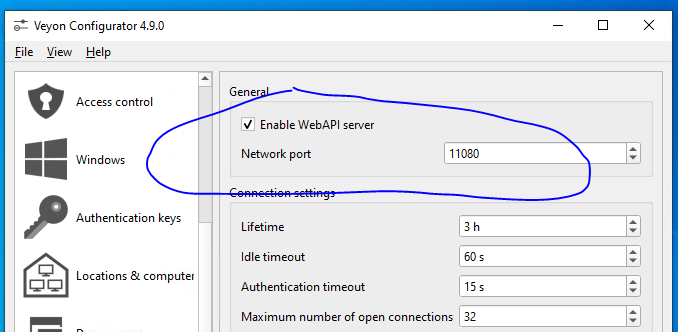
    d5c19355-e544-4b17-9d6c-651c1dda3a0b-image.png

    But it can't seem to be accessed?

    I am using veyon-4.9.0.0-win64-setup on Win 10 X64.

    1 Reply Last reply
    0
    • C Offline
      C Offline
      casperyc
      wrote on last edited by
      #2

      Anyone?

      I have been troubleshooting this for more than a month....

      1 Reply Last reply
      0
      • S Offline
        S Offline
        stelemanuele77
        wrote on last edited by
        #3

        Same issues, when trying to authenticate it gets stuck and doesn't do anything

        1 Reply Last reply
        0
        • W Offline
          W Offline
          william
          wrote on last edited by
          #4

          Same issues when install veyon master on Windows 10.
          I don't know what's wrong, I already check the port already active.
          Try install veyon master on linux and authenticate it using Postman and it works.
          This is my solution until now

          1 Reply Last reply
          0

          Hello! It looks like you're interested in this conversation, but you don't have an account yet.

          Getting fed up of having to scroll through the same posts each visit? When you register for an account, you'll always come back to exactly where you were before, and choose to be notified of new replies (either via email, or push notification). You'll also be able to save bookmarks and upvote posts to show your appreciation to other community members.

          With your input, this post could be even better 💗

          Register Login
          Reply
          • Reply as topic
          Log in to reply
          • Oldest to Newest
          • Newest to Oldest
          • Most Votes


          Powered by NodeBB | Contributors
          • Login

          • Don't have an account? Register

          • Login or register to search.
          • First post
            Last post
          0
          • Categories
          • Recent
          • Tags
          • Popular
          • Users
          • Groups