Cannot remote control student sessions
-
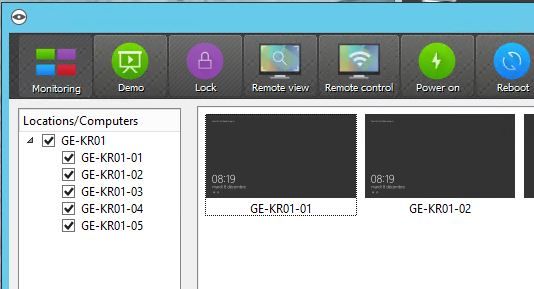
Hi, I cannot take control of student sessions. All computers are Windows Server 2012-R2. In Veyon Master, I can only see the student's logon screen and if I double click one, I get to the logon screen. I do not want to logon but to access their session to see or control (help) them. How can I configure that? Thanks.
-
Are the student sessions virtual/remote desktop sessions? If so try enabling multi session mode (https://docs.veyon.io/en/latest/admin/reference.html#refmultisessionmode) and try the NetworkDiscovery add-on with session scanning enabled so it will access the Veyon Server instances at ports 111XX instead of 11100 only (which is the console session). BTW we'll publish a tutorial on how to work with remote/virtual desktop sessions in a few weeks.
Hello! It looks like you're interested in this conversation, but you don't have an account yet.
Getting fed up of having to scroll through the same posts each visit? When you register for an account, you'll always come back to exactly where you were before, and choose to be notified of new replies (either via email, or push notification). You'll also be able to save bookmarks and upvote posts to show your appreciation to other community members.
With your input, this post could be even better 💗
Register Login