ldap password with an @ --> cmd test and "base DN Fixe" fail to connect
-
hello every body ,
i wana test Veyon and buil a VM poc.
-
when i try to connect to ldap server via the gui -> connection succed.
-
when i try to configure base DN the test fail :
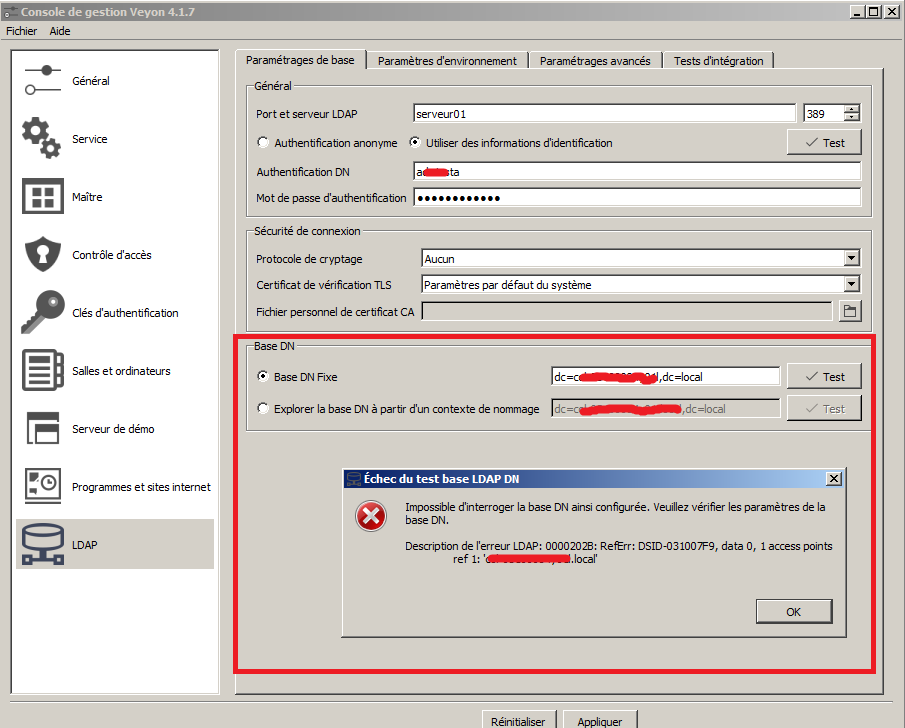
I follow the Veyon documentation and try on terminal (CMD windows 7 for this test ) with this patern :
veyon-ctl ldap autoconfigurebasedn ldap://Administrator:MYPASSWORD@192.168.1.2:389/
"Les arguments donnÚs ne sont pas valide"I think the PB is my admin passwordcontain an @ this caracter use to delimit ... so i 've tried to echap it, adding quotes ... but i always get the same reply "bad arguments"
Did somedody know how to echap the @ ?
thanks for your help
-
-
Hi,
I just updated the docs at https://docs.veyon.io/en/latest/admin/ldap.html#command-line-interface to include a hint on how to encode special characters using percent-encoding. In your case you can specify%40for@.
Best regards -
Hi,
I just updated the docs at https://docs.veyon.io/en/latest/admin/ldap.html#command-line-interface to include a hint on how to encode special characters using percent-encoding. In your case you can specify%40for@.
Best regards@tobydox Thanks for your help Tobydox, i have tried in cmd under windows and i always get an error. If i try with the graphic interface authentification "@" in my password this work perfectly.
Hello! It looks like you're interested in this conversation, but you don't have an account yet.
Getting fed up of having to scroll through the same posts each visit? When you register for an account, you'll always come back to exactly where you were before, and choose to be notified of new replies (either via email, or push notification). You'll also be able to save bookmarks and upvote posts to show your appreciation to other community members.
With your input, this post could be even better 💗
Register Login