Shift Key not working
-
Using Linuxmint 19 Tara and using Veyon 4.1.4 in my classroom. There is a big-widescreen-pc as a whiteboard in my classroom and my SHIFT key does not working on any client when I use Remote Control mode. It is not a fast way to use client's onscreen keyboard and Fullscreen Demo mode causes a black portion on the right side of the client's screen when casting 4:3 resolution to 16:9.
-
Using Linuxmint 19 Tara and using Veyon 4.1.4 in my classroom. There is a big-widescreen-pc as a whiteboard in my classroom and my SHIFT key does not working on any client when I use Remote Control mode. It is not a fast way to use client's onscreen keyboard and Fullscreen Demo mode causes a black portion on the right side of the client's screen when casting 4:3 resolution to 16:9.
on 4.1.2 version, the shift key also does not work
 with Linux Client. with Windows client works ok. Whereis the problem? on Linux vnc server?
 -
This is caused by a problem with VNC. It can be fixed by doing the following:
Load veyon configurator
Click on Service on the left side
Change the VNC server settings as follows:
Plugin: Builtin VNC server
Custom x11vnc parameters: -nomodtweak
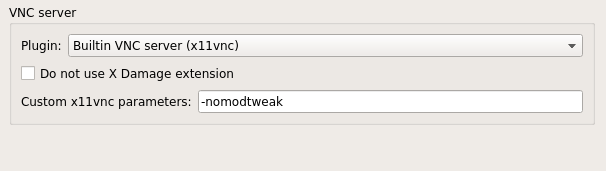
This must be done on both master and remote.
-
Thanks for providing the investigations and sharing the workaround! While scrutinizing the issue I spotted a problem in the build system leading to relevant x11vnc features such as the keyboard extension not being enabled at compile time. This will be fixed in 4.1.6.

Hello! It looks like you're interested in this conversation, but you don't have an account yet.
Getting fed up of having to scroll through the same posts each visit? When you register for an account, you'll always come back to exactly where you were before, and choose to be notified of new replies (either via email, or push notification). You'll also be able to save bookmarks and upvote posts to show your appreciation to other community members.
With your input, this post could be even better 💗
Register Login