Skip to content
  • Categories
  • Recent
  • Tags
  • Popular
  • Users
  • Groups
Skins
  • Light
  • Cerulean
  • Cosmo
  • Flatly
  • Journal
  • Litera
  • Lumen
  • Lux
  • Materia
  • Minty
  • Morph
  • Pulse
  • Sandstone
  • Simplex
  • Sketchy
  • Spacelab
  • United
  • Yeti
  • Zephyr
  • Dark
  • Cyborg
  • Darkly
  • Quartz
  • Slate
  • Solar
  • Superhero
  • Vapor

  • Default (No Skin)
  • No Skin
Collapse

Veyon Community Forum

  1. Home
  2. Help & Troubleshooting
  3. Veyon 4.10

Veyon 4.10

Scheduled Pinned Locked Moved Help & Troubleshooting
5 Posts 4 Posters 189 Views
  • Oldest to Newest
  • Newest to Oldest
  • Most Votes
Reply
  • Reply as topic
Log in to reply
This topic has been deleted. Only users with topic management privileges can see it.
  • F Offline
    F Offline
    FoxBzh
    wrote last edited by
    #1

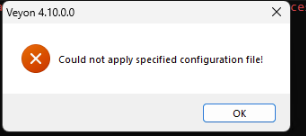
    2b50c73a-940d-4aa5-8dad-f97cea9d0673-image.png

    Hello, have you ever encountered this problem? I upgraded from version 4.9 to 4.10. Thank you.

    1 Reply Last reply
    0
    • F Offline
      F Offline
      FoxBzh
      wrote last edited by
      #2

      up personne ?

      1 Reply Last reply
      0
      • D Offline
        D Offline
        Damiel
        wrote last edited by
        #3

        Same problem here. To make sure it's not related to my config file, I also tried the following: uninstall Veyon, delete HKLM\Software\Veyon Solution tree from registry, install Veyon without /ApplyConfig, export the default settings to a new .json file with Veyon Configurator. Uninstall Veyon again, reinstall with /ApplyConfig using the newly create .json file. Same error message.

        I also noted the Application event log of Windows is flooded with "Application Error", EventID 1000 messages in module Qt5Core.dll. Don't know if this is related to the above error.

        1 Reply Last reply
        0
        • G Offline
          G Offline
          GamingSanctum
          wrote last edited by
          #4

          I am also facing this problem.

          1 Reply Last reply
          0
          • B Offline
            B Offline
            brice73
            wrote last edited by
            #5

            I also have this problem with Veyon 4.10.0.0. First time I run into this one (v4.9.7.0 and older versions did not show this problem). Btw, we are currently under Windows 11 24H2 in our organization.

            1 Reply Last reply
            0
            Reply
            • Reply as topic
            Log in to reply
            • Oldest to Newest
            • Newest to Oldest
            • Most Votes


            Powered by NodeBB | Contributors
            • Login

            • Don't have an account? Register

            • Login or register to search.
            • First post
              Last post
            0
            • Categories
            • Recent
            • Tags
            • Popular
            • Users
            • Groups