Demo will not start forever
-
Hi, I need help for using demonstraion function to broadcast my display to student's PC.
I could use demonstration function before, but now it will not broadcasted and stopp at the waiting screen forever like this image.
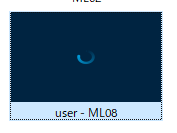
I can use the monitoring PCs and Lock function and remote control well, so it seems not communication to the each PCs. I feel something setting wrong on master PC for broadcasting video image.
FYI, I tried 2 PCs for master, but both are same sympton.
Would anyone can advice for this situation?
-
Hi, I need help for using demonstraion function to broadcast my display to student's PC.
I could use demonstration function before, but now it will not broadcasted and stopp at the waiting screen forever like this image.
I can use the monitoring PCs and Lock function and remote control well, so it seems not communication to the each PCs. I feel something setting wrong on master PC for broadcasting video image.
FYI, I tried 2 PCs for master, but both are same sympton.
Would anyone can advice for this situation?
@DCteacher We are having the same issue. So far I haven't been able to identify the cause, but it seems to help to demo in a window instead of full screen and to restart the teacher machine if both window & full screen doesn't work.
If anyone knows the cause of this, I would love to hear it. We're currently using 4.7.4.
-
@DCteacher We are having the same issue. So far I haven't been able to identify the cause, but it seems to help to demo in a window instead of full screen and to restart the teacher machine if both window & full screen doesn't work.
If anyone knows the cause of this, I would love to hear it. We're currently using 4.7.4.
@ClaireSmuts
Thank you for your response! It is good to know same thing happening.In my case, both sharing with Fullscreen and In Window are same issue.
And I tried to use different PC with fresh installation, but still same issue.
As information, all the PC are Windows 10. -
Hi, what type of authentication do you use?
If it is by key, be sure to have both private and public keys in the teacher's installation.
Hope this helps.
Have a good day.
-
@bacsom you welcome! I think you already checked the windows firewall, trying to disable it on both Student and Teacher Pcs. The next step I would check from Lan "Network properties" would be to see if both student and teacher PCs are on "Private" (not Public) network . If all of these settings have been checked maybe some traffic is blocked by the school's router/firewall? Have you even been able to use Veyon's Demo in older releases?
-
Hi, what type of authentication do you use?
If it is by key, be sure to have both private and public keys in the teacher's installation.
Hope this helps.
Have a good day.
-
@DCteacher
You are very welcome!
So it was the public key, good to know.
I'm happy you have solved the issue!Have a good day!
Carlo
Hello! It looks like you're interested in this conversation, but you don't have an account yet.
Getting fed up of having to scroll through the same posts each visit? When you register for an account, you'll always come back to exactly where you were before, and choose to be notified of new replies (either via email, or push notification). You'll also be able to save bookmarks and upvote posts to show your appreciation to other community members.
With your input, this post could be even better 💗
Register Login