Skip to content
  • Categories
  • Recent
  • Tags
  • Popular
  • Users
  • Groups
Skins
  • Light
  • Brite
  • Cerulean
  • Cosmo
  • Flatly
  • Journal
  • Litera
  • Lumen
  • Lux
  • Materia
  • Minty
  • Morph
  • Pulse
  • Sandstone
  • Simplex
  • Sketchy
  • Spacelab
  • United
  • Yeti
  • Zephyr
  • Dark
  • Cyborg
  • Darkly
  • Quartz
  • Slate
  • Solar
  • Superhero
  • Vapor

  • Default (No Skin)
  • No Skin
Collapse

Veyon Community Forum

  1. Home
  2. Help & Troubleshooting
  3. Accept connection?

Accept connection?

Scheduled Pinned Locked Moved Help & Troubleshooting
6 Posts 3 Posters 858 Views
  • Oldest to Newest
  • Newest to Oldest
  • Most Votes
Reply
  • Reply as topic
Log in to reply
This topic has been deleted. Only users with topic management privileges can see it.
  • G Offline
    G Offline
    gerardsweeney
    wrote on last edited by
    #1

    Hi.

    Is there a way where a PC being monitored/remoted has to click "Allow" to permit the incoming connection?

    Hopefully it's something REALLY obvious that I've missed.

    Thanks,
    Gerard

    1 Reply Last reply
    0
    • T Offline
      T Offline
      tobydox
      wrote on last edited by
      #2

      Hi Gerard,

      yes this can be configured using access control rules: https://docs.veyon.io/en/latest/admin/access-control-rules.html There's an action "Ask logged on user for permission" which will do exactly what you're asking for.

      Best regards
      Tobias

      G 1 Reply Last reply
      1
      • T tobydox

        Hi Gerard,

        yes this can be configured using access control rules: https://docs.veyon.io/en/latest/admin/access-control-rules.html There's an action "Ask logged on user for permission" which will do exactly what you're asking for.

        Best regards
        Tobias

        G Offline
        G Offline
        gerardsweeney
        wrote on last edited by
        #3

        @tobydox said in Accept connection?:

        Hi Gerard,

        yes this can be configured using access control rules: https://docs.veyon.io/en/latest/admin/access-control-rules.html There's an action "Ask logged on user for permission" which will do exactly what you're asking for.

        Best regards
        Tobias

        Brilliant - that's exactly what I need (how the heck did I miss it?).
        I'll look at testing this on Monday when I'm back in work.

        1 Reply Last reply
        0
        • G Offline
          G Offline
          gerardsweeney
          wrote on last edited by
          #4

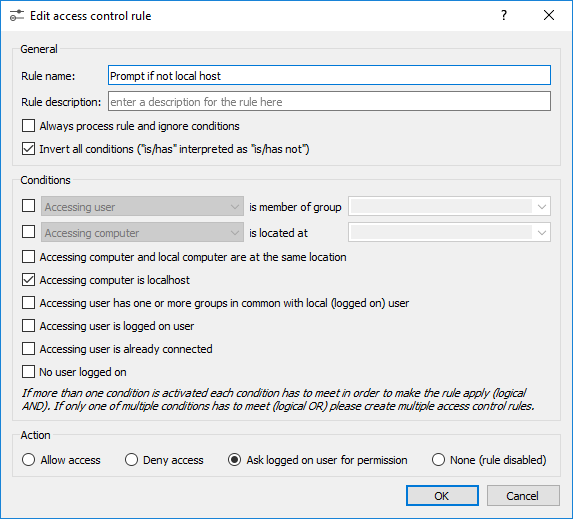
          It seems to work, but I had to set the rules to do it if NOT localhost.
          Otherwise, anyone running master would get prompted to connect to themselves 🙂

          K 1 Reply Last reply
          0
          • G gerardsweeney

            It seems to work, but I had to set the rules to do it if NOT localhost.
            Otherwise, anyone running master would get prompted to connect to themselves 🙂

            K Offline
            K Offline
            koen.degraeve
            wrote on last edited by
            #5

            @gerardsweeney
            What do you mean with 'It seems to work, but I had to set the rules to do it if NOT localhost.'?

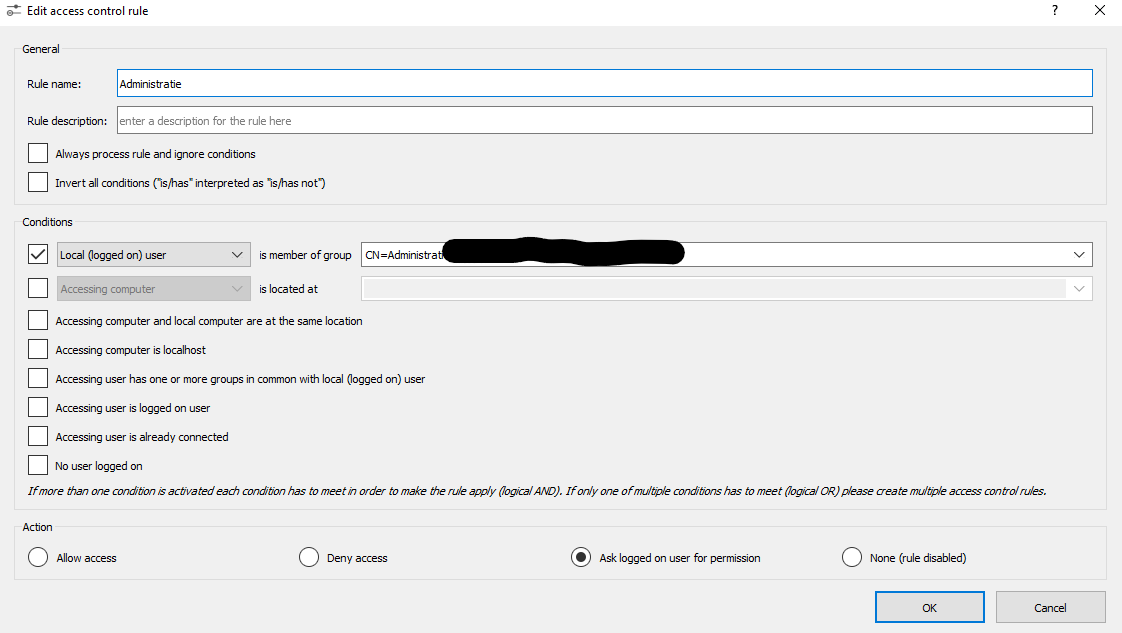
            What I want to achieve: When I access a computer where an administrative user is logged in, the user needs to click Allow.
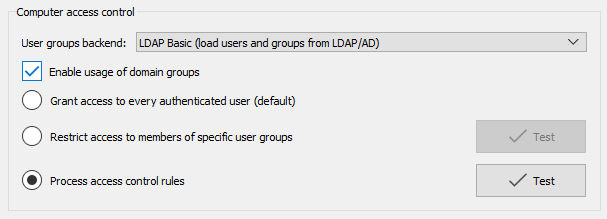
            I made an access rule (see attached files), but the administrative user is not getting a pop-up to Allow remote control...

            What am I doing wrong?

            computeraccesscontrol.png accesscontrolrule.png

            1 Reply Last reply
            0
            • G Offline
              G Offline
              gerardsweeney
              wrote on last edited by
              #6

              Hi..

              Apologies for the delay in getting back to you.

              I'm afraid that I don't use the group member aspect, so can't really help with that one.

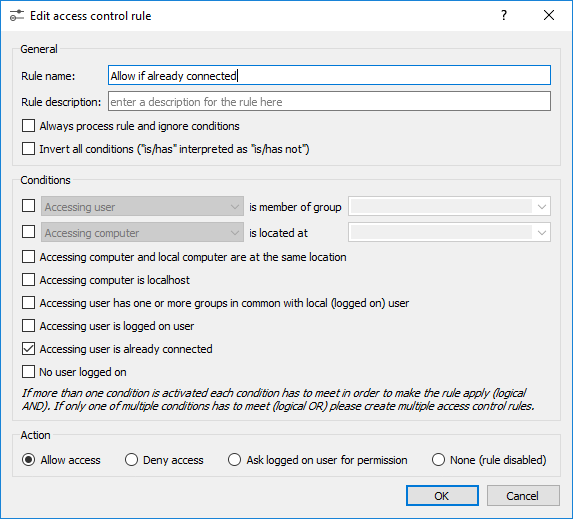
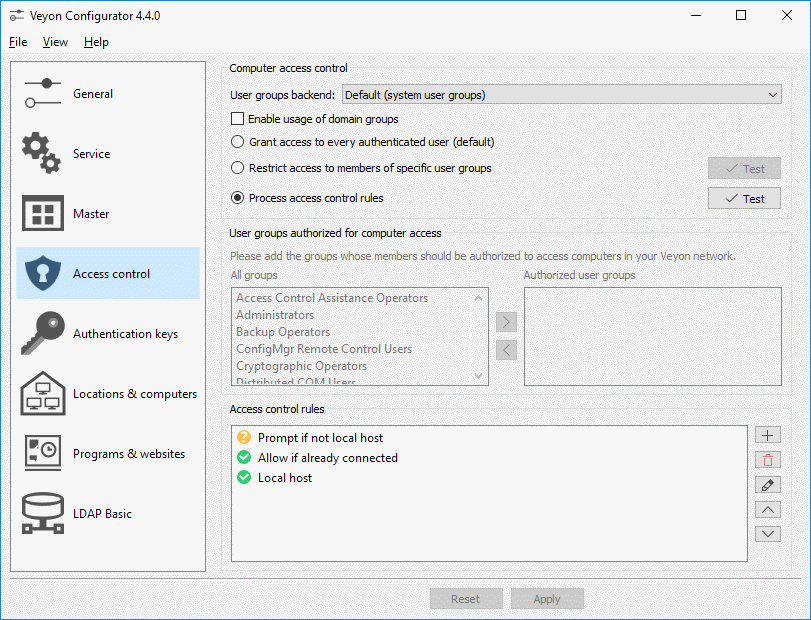
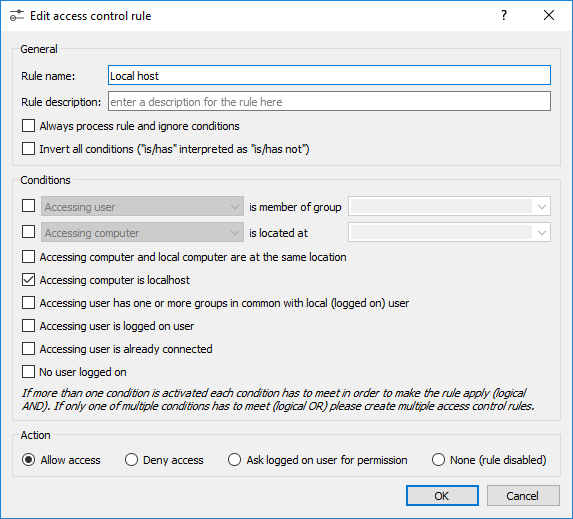
              Here are grabs of my config:
              Access04.png Access03.png Access02.png Access01.png

              1 Reply Last reply
              0

              Hello! It looks like you're interested in this conversation, but you don't have an account yet.

              Getting fed up of having to scroll through the same posts each visit? When you register for an account, you'll always come back to exactly where you were before, and choose to be notified of new replies (either via email, or push notification). You'll also be able to save bookmarks and upvote posts to show your appreciation to other community members.

              With your input, this post could be even better 💗

              Register Login
              Reply
              • Reply as topic
              Log in to reply
              • Oldest to Newest
              • Newest to Oldest
              • Most Votes


              Powered by NodeBB | Contributors
              • Login

              • Don't have an account? Register

              • Login or register to search.
              • First post
                Last post
              0
              • Categories
              • Recent
              • Tags
              • Popular
              • Users
              • Groups