veyon-server doesn't start (Qt::AA_ShareOpenGLContexts must be set before QCoreApplication)
-
This is just a warning which has been fixed in Veyon 4.5.6 but unfortunately it's not related to the server start problem

Did you already try to enable advanced the "Write to logging system of operating system" option (https://docs.veyon.io/en/latest/admin/reference.html#logging) and change the log level to debug? You should then see the output of the
veyon-serverprocess in theveyon-serviceunit's journal. If the programcatchsegvis inPATH, it will be used to dump a possible backtrace of the server if it crashes. -
This is just a warning which has been fixed in Veyon 4.5.6 but unfortunately it's not related to the server start problem
Did you already try to enable advanced the "Write to logging system of operating system" option (https://docs.veyon.io/en/latest/admin/reference.html#logging) and change the log level to debug? You should then see the output of the
veyon-serverprocess in theveyon-serviceunit's journal. If the programcatchsegvis inPATH, it will be used to dump a possible backtrace of the server if it crashes.@tobydox
Hi. I enabled the Logfiles in Debug-Mode.
Now I found this:/tmp]$ tail VeyonService.log 2021-05-29T11:52:41.093: [INFO] LinuxServiceCore::startServer(): Starting server for new session "/org/freedesktop/login1/session/_32" with ID 0 at seat "/org/freedesktop/login1/seat/seat0" 2021-05-29T11:55:20.873: [ERR] LinuxServiceCore::startServer(): Can't start Veyon Server in Wayland sessions as this is not yet supported. Please switch to X11-based sessions! 2021-05-29T11:55:23.198: [DEBUG] PlatformSessionManager::closeSession(): Closing session 0 for platform session "/org/freedesktop/login1/session/_32" 2021-05-29T11:55:23.198: [INFO] LinuxServiceCore::stopServer(): stopping server for removed session "/org/freedesktop/login1/session/_32" 2021-05-29T11:55:35.946: [DEBUG] LinuxServiceCore::startServWhen I observe the process
veyon-servicewithcatchsegvI found this:29/05/2021 12:12:03 Xinerama: number of sub-screens: 1 29/05/2021 12:12:03 Xinerama: no blackouts needed (only one sub-screen) 29/05/2021 12:12:03 X11 MIT Shared Memory Attach failed: Is your DISPLAY=:0 on a remote machine? Suggestion, use: x11vnc -display :0 ... for local display :0 caught X11 error: 29/05/2021 12:12:03 deleted 32 tile_row polling images. X Error of failed request: BadAccess (attempt to access private resource denied) Major opcode of failed request: 130 (MIT-SHM) Minor opcode of failed request: 1 (X_ShmAttach) Serial number of failed request: 57 Current serial number in output stream: 91And afterwards the same with
veyon-server:2021-05-29T12:15:35.158: [DEBUG] VeyonCore::initSystemInfo(): "4.5.5" "fossa.my-domain.de" "linux" "5.8.0-53-generic" "Ubuntu 20.04.2 LTS" "ubuntu" "20.04" 2021-05-29T12:15:35.166: [ERR] VncServer::VncServer(): no VNC server plugins found! 2021-05-29T12:15:35.196: [DEBUG] [KLDAP] connection closed! 2021-05-29T12:15:35.196: [DEBUG] [KLDAP] ldap url: "ldap://server.my-domain.de:3268" 2021-05-29T12:15:35.197: [DEBUG] [KLDAP] setting version to: 3 2021-05-29T12:15:35.197: [DEBUG] [KLDAP] setting timeout to: 0 2021-05-29T12:15:35.197: [DEBUG] [KLDAP] setting security to: 1 2021-05-29T12:15:35.197: [DEBUG] [KLDAP] start TLS 2021-05-29T12:15:35.264: [DEBUG] [KLDAP] setting sizelimit to: 0 2021-05-29T12:15:35.264: [DEBUG] [KLDAP] setting timelimit to: 0 2021-05-29T12:15:35.264: [DEBUG] [KLDAP] initializing SASL client 2021-05-29T12:15:35.264: [DEBUG] [KLDAP] binding to server, bindname: "<MY-SAMBA-DOMAIN>\\admin" password: ***** 2021-05-29T12:15:35.264: [DEBUG] [KLDAP] ldap_sasl_bind_s (simple) 2021-05-29T12:15:35.303: [DEBUG] FeatureWorkerManager::startUnmanagedSessionWorker(): Starting worker (unmanaged session process) for feature QUuid("{8e997d84-ebb9-430f-8f72-d45d9821963d}") 2021-05-29T12:15:35.304: [DEBUG] FeatureWorkerManager::sendMessageToUnmanagedSessionWorker(): User session likely not yet available - retrying worker start 2021-05-29T12:15:35.304: [DEBUG] VncProxyServer::start(): started on port 11100 2021-05-29T12:15:35.304: [DEBUG] VncServer::prepare(): 2021-05-29T12:15:35.304: [DEBUG] VeyonCore::exec(): Running 2021-05-29T12:15:35.305: [DEBUG] VeyonCore::exec(): Exit 2021-05-29T12:15:35.305: [DEBUG] ComputerControlServer::~ComputerControlServer(): 2021-05-29T12:15:35.305: [DEBUG] VncServer::~VncServer(): 2021-05-29T12:15:35.305: [DEBUG] Logger::~Logger(): Shutdown PluginManager::~PluginManager(): CryptoCore::~CryptoCore(): KLDAP: connection closed!Is this helpful?
-
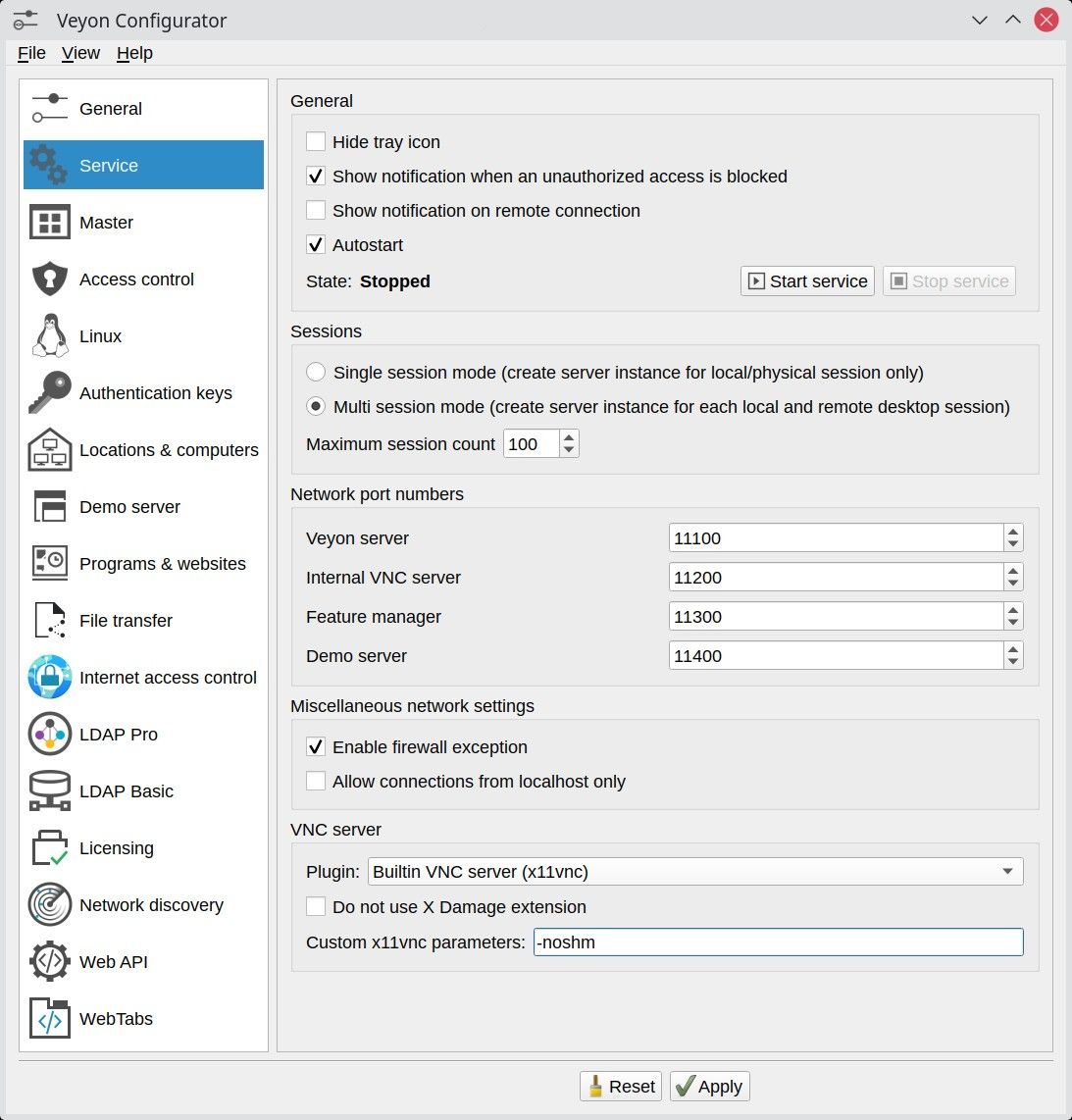
Can you try to add
-noshmas additional custom x11vnc parameter in the advanced VNC server configuration?@tobydox said in veyon-server doesn't start (Qt::AA_ShareOpenGLContexts must be set before QCoreApplication):
-noshm
Wow -- I think that's the solution! I just added this option and restarted the Client -- now "htop" shows a running veyon-server ... I can't test it in our productive environment at the moment but it looks good so far! Thank you!
-
@tobydox said in veyon-server doesn't start (Qt::AA_ShareOpenGLContexts must be set before QCoreApplication):
-noshm
Wow -- I think that's the solution! I just added this option and restarted the Client -- now "htop" shows a running veyon-server ... I can't test it in our productive environment at the moment but it looks good so far! Thank you!
@white_rabbit where do you add this parameter? Is it in the Veyon configuration interface somewhere?
-
@white_rabbit where do you add this parameter? Is it in the Veyon configuration interface somewhere?
-
The VNC server section is correct, make sure to enable advanced view in the menu and to select "Builtin VNC server":
-
@tobydox the master computer is running Windows 10 and does not have an option for parameters. The built-in vnc is UltraVNC.
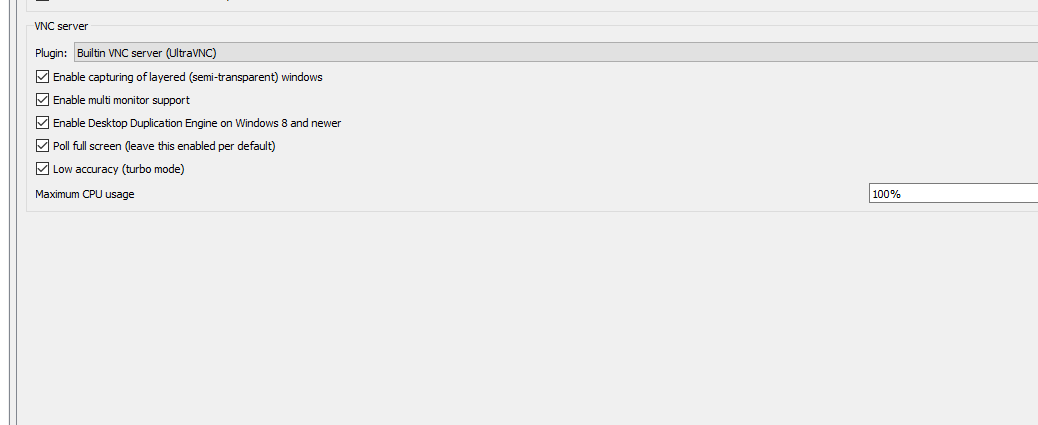
Since the Linux-based student computers are affected, you have to make the configuration changes on them directly

-
Since the Linux-based student computers are affected, you have to make the configuration changes on them directly
-
Since the Linux-based student computers are affected, you have to make the configuration changes on them directly
-
Can you try to add
-noshmas additional custom x11vnc parameter in the advanced VNC server configuration?@tobydox nice. This solved an issue I've been struggling with for quite q few days:) thanks!
Hello! It looks like you're interested in this conversation, but you don't have an account yet.
Getting fed up of having to scroll through the same posts each visit? When you register for an account, you'll always come back to exactly where you were before, and choose to be notified of new replies (either via email, or push notification). You'll also be able to save bookmarks and upvote posts to show your appreciation to other community members.
With your input, this post could be even better 💗
Register Login