Default mode
-
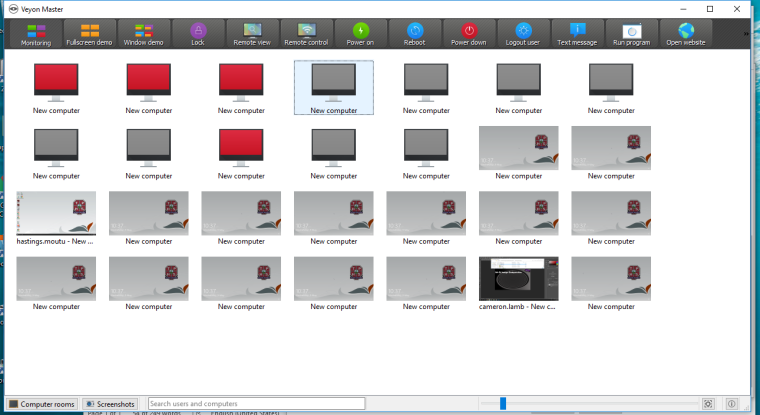
I am using Veyon 4.0.5. The default mode I am referring to is the monitoring screen that first displays once I start up and log into Veyon. All the computers in the room are displayed and once students login to the computers their screens start rotating (or refreshing).
-
This is a link to a video https://drive.google.com/file/d/1Mk5judSgUUm87fsYiW-2-FszSoCzrM4_/view?usp=sharing
The behaviour I would ideally like is that the students computers remain constant on the screen i.e. not rotating around or at least slow down the refresh rate. To lock down a students computer is challenging as once I select the computer, it moves before I can select the lock functionality. More than once I end up locking a students computer that is actually on task.
-
Thanks for the clarification! This happens because all your computers have the same name ("New computer") and therefore are not sorted properly. Please give all computers individual names and the sort order should be stable.
Hello! It looks like you're interested in this conversation, but you don't have an account yet.
Getting fed up of having to scroll through the same posts each visit? When you register for an account, you'll always come back to exactly where you were before, and choose to be notified of new replies (either via email, or push notification). You'll also be able to save bookmarks and upvote posts to show your appreciation to other community members.
With your input, this post could be even better 💗
Register Login